GTFO VR Postmortem
I ramble about creating a VR mod for GTFO
Intro
Over half a decade, 500 commits, and the better part of a thousand hours ago, I spent a boring afternoon wondering what GTFO would look like in VR. Then I made the mistake of trying to find out.
I’ve kept an eye on GTFO ever since its gameplay trailer at the Game Awards in 2017. It ticked all the right boxes for me: Survival horror, co-op, shooter, extreme difficulty (allegedly.)
I managed to join every playtest and could not get enough of the game each time. GTFO’s setting; the ‘Complex’ is a marvel to look at and the monsters inhabiting it were unique and interesting. The game was (and still is) extremely difficult and extremely fun, just as promised.
First Foray Into Modding
I started tinkering with GTFO even before the first alpha test was finished. I quickly found out that decompiling and modifying Unity games is quite trivial. Using DnSpy/DotPeek, you can easily peer into basically-source-code of the game, because Mono (Unity’s default scripting backend) compiles to .NET bytecode, which retains almost everything needed to reconstruct the original source.
For example, this is what we can retrieve from a Unity project I quickly cobbled together:
Decompiled code
1
2
3
4
5
6
7
8
9
10
11
12
13
14
15
16
public class DeleteIfNear : MonoBehaviour
{
  [SerializeField]
  private GameObject Offender;
  [SerializeField]
  private float Distance = 50f;

  private void Update()
  {
    if (!((Object) this.Offender != (Object) null) || (double) (this.transform.position - this.Offender.transform.position).sqrMagnitude >= (double) this.Distance * (double) this.Distance)
      return;
    Debug.Log((object) ("Deleting offender " + this.Offender.name));
    Object.Destroy((Object) this.Offender);
    this.Offender = (GameObject) null;
  }
}
From the original source:
Source code
1
2
3
4
5
6
7
8
9
10
11
12
13
14
15
16
17
18
19
20
21
22
23
24
25
26
/// <summary>
/// Deletes an object if it gets close enough
/// </summary>
public class DeleteIfNear : MonoBehaviour
{
  [SerializeField]
  private GameObject Offender;

  [SerializeField]
  private float Distance = 50.0f;

  void Update()
  {
    // If distance to target is less than Distance, we delete the offender
    if (Offender != null)
    {
      Vector3 toOffender = transform.position - Offender.transform.position;
      if (toOffender.sqrMagnitude < Distance * Distance)
      {
          Debug.Log($"Deleting offender {Offender.name}");
          Destroy(Offender);
          Offender = null;
      }
    }
  }
}
Comments are stripped out, casts are explicit and the code is ‘optimized’ in general. All in all, it’s still perfectly readable. It’s not easy to navigate a large codebase like GTFO’s in the first place, but this definitely beats staring at raw disassembly.
At first, I only used DnSpy to modify assemblies in-place. Quite quickly, I was able to create my first (unreleased) mod for an alpha version of the game — a more ‘efficient’ solution to dealing with the game’s (at the time) most dangerous enemy, the scout, featuring custom code and ‘borrowed’ assets.
We blow up a scout with the BFG9000
The game’s full release soon followed and yet again, after getting through all the content, I still couldn’t get enough of it. With the next update nowhere in sight, that fateful, boring afternoon arrived.
Armed with knowledge of Unity and VR dev from my day job, beginner-level modding knowledge and some experience with SteamVR, I started cobbling together something that would allow you to admire GTFO’s bestiary up close and personal.
And up close and personal it was. Within VR, enemies that looked somewhat big on-screen were suddenly towering over you. Gruesome details became far more apparent and getting disoriented in the Complex was never this easy. It was everything I had hoped for.
Over the next few weeks I added fixes that allowed me to play even full matches in VR.
The community expressed interest in a public release. Meanwhile, DnSpy was giving me issues. Turns out modifying assemblies in-place repeatedly is not that stable. Keeping track of my modifications also started to become cumbersome. After one too many random crashes and the inability to legally distribute the mod as altered game assemblies, I needed a solution.
Harmony and BepInEx to the rescue
The solution was runtime patching. Harmony is a library that allows one to prepend, append (or even replace) code in existing methods at runtime. Much like the name suggests, because of prepending/appending code being the main paradigm, most mods can coexist by default. BepInEx is a mod manager for Unity games built around loading Harmony-based mods.
1
2
3
4
5
6
7
8
9
10
11
12
13
14
15
  /// <summary>
  /// Add event calls for the player shooting weapons
  /// </summary>

  [HarmonyPatch(typeof(Weapon), nameof(Weapon.ApplyRecoil))]
  internal class InjectPlayerWeaponFireEvents
  {
      private static void Postfix(Weapon __instance)
      {
          if(__instance.Owner.IsLocallyOwned)
          {
              PlayerFireWeaponEvents.WeaponFired(__instance);
          }
      }
  }
When the game starts, this code will be added to the end of the Weapon.ApplyRecoil method in GTFO’s code.
The main idea is that distributing modified game code is not legal because most of what you’d be distributing is copyrighted. However, distributing code that modifies the game code on the user’s PC is fine. Switching to the Harmony/BepInEx stack allowed me to finally upgrade the mod into a proper, organized project with source control and throw it on GitHub. That marks the first commit, on the 1st of February, 2020.
With the project in a maintainable state and released to the public, I continued adding features. The first goal was to get the game playable entirely within VR. Most notably, this meant getting motion controls, the game menu, in-game UI, and the in-game terminal interaction working. Over the next couple of months, this all ended up making it into the mod. Over the next couple of years, the mod was kept up to date with game updates. Various improvements have been made to many systems, including large contributions by other developers(!)
The Gameplay in VR
Switching to VR came with its own set of challenges. As GTFO is all about difficulty and cooperative gameplay, my main driving idea was that players should not be too disadvantaged or advantaged relative to non-VR players.
Shooting accurately was difficult in the VR version. For a long time, ironsights/optics did not render properly in VR and/or did not closely match the aiming direction. For this reason, I decided to include a built-in laser pointer for all weapons. Eventually, the devs themselves switched to a shader which made sights line up (and look) quite nicely, so I made the laser pointer toggleable.
Some effort also had to be spent on combating cheating. Peeking through doors by walking through them in roomscale or shooting through them by sticking your gun behind them were easy to do in VR. Thankfully this was easily mitigated by blacking out the screen if your head was inside collision. Had I not done this, players would find a way to optimize their own fun away.
UI was challenging in general. I wanted to avoid copying the 2D UI where possible to promote immersion. I ended up doing some custom watch-style UI like most other VR shooters. While being diegetic is very cool, I think it could have definitely used an artist’s/designer’s touch. MrKerag did end up creating a better model for the watch, so at the least you don’t have to brave the Complex with a Fitbit anymore.
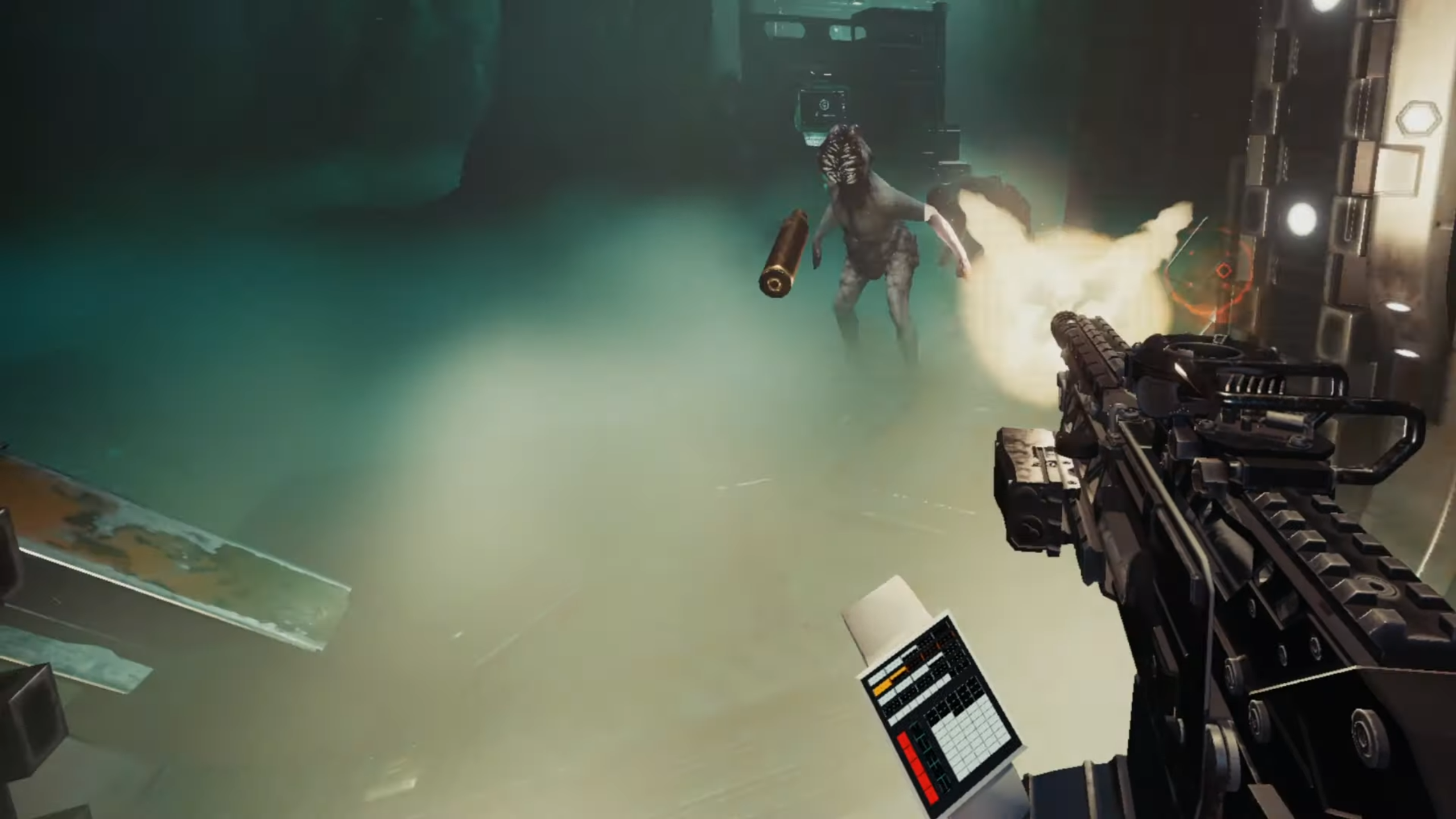 The Fitbit in question
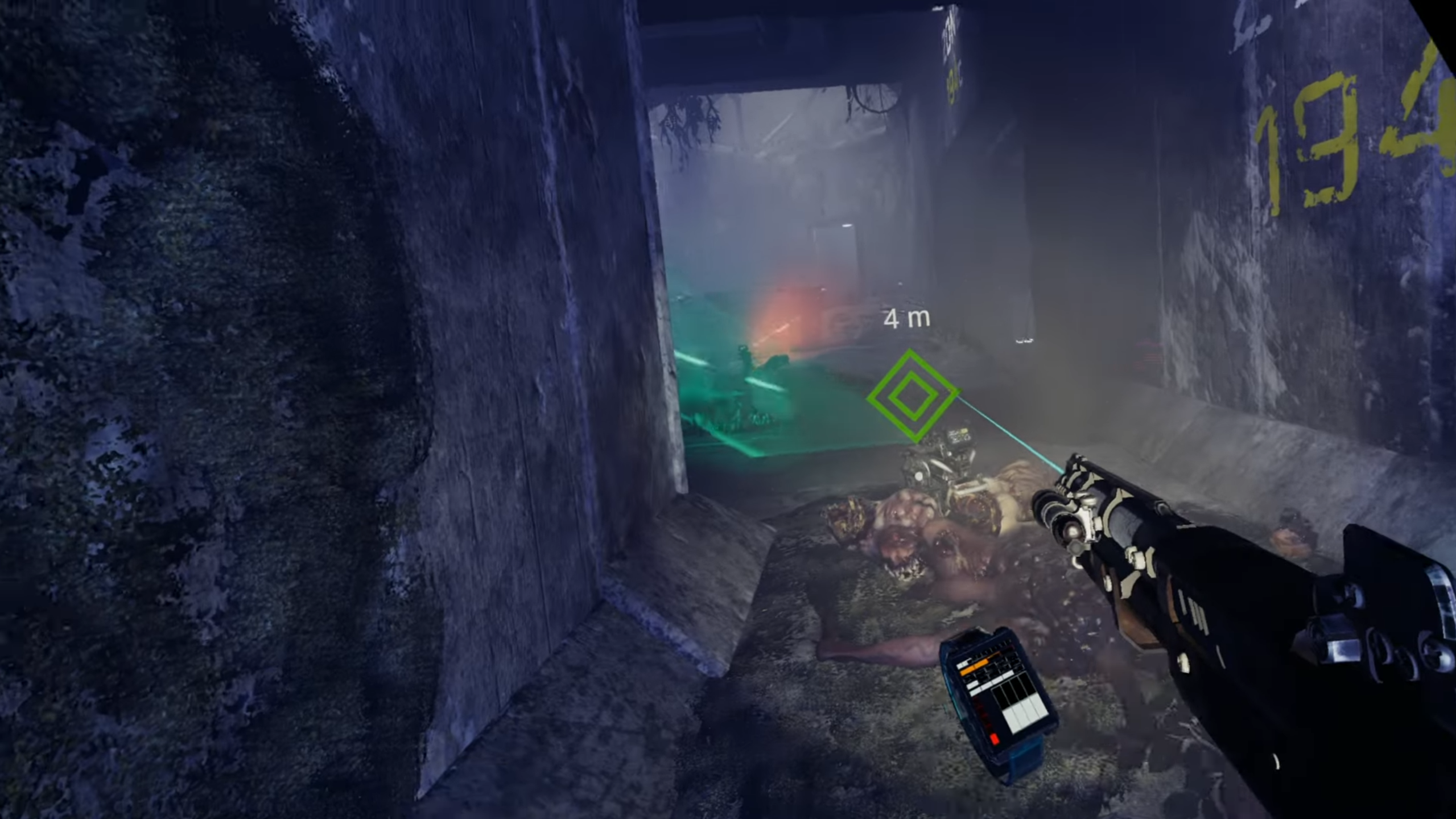 And the improved version
For the menu UI I went with a simple throwaway hack where I show an interactable, curved SteamVR overlay with the 2D game menu pasted onto it. This ended up working rather well, so I kept it. The steam overlay API was easy to work with and raycasting against it to position the in-game cursor was trivial. Most of all, I was able to completely circumvent dealing with any custom menu UI rendering and related problems.
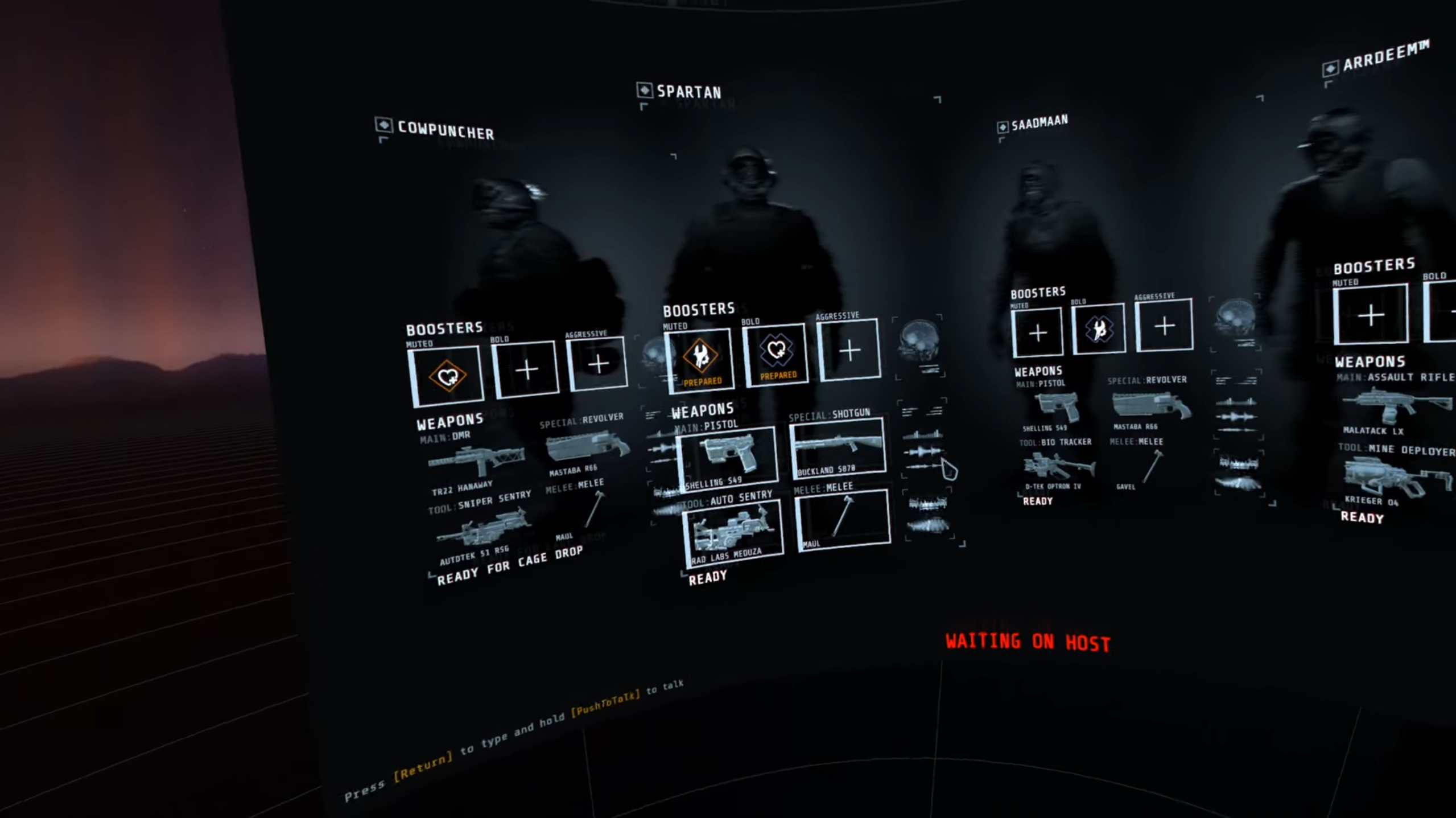 The VR game menu
GTFO also features interactive computer terminals, which are quite an important part of the game. At first I used a virtual keyboard, which lived inside the VR runtime. I had some crappy shortcuts built-in as upper-case keys. It worked well enough, but it was far from user friendly. Thankfully, due to the valiant efforts of Nordskogg, a new version of the terminal interaction appeared with a full, user-friendly, in-game keyboard with some amazing features like on-screen text selection.
 Nordskogg’s improved terminal
Additionally, I tried to keep QoL and/or ‘cool’ features in mind:
- Support for left-handedness.
- Crouching in the game if you crouch for-real.
- Various 3D/2D UI toggles.
- VR controller mechanics (mostly two-handed aiming related settings.)
- VR specific graphics options.
- Laser pointer colors (because why not.)
Another notable setting is a height offset; some levels contain neck-height poisonous fog, and players of shorter stature found their heads didn’t quite reach above it in VR.
In a similar vein, I added an optional ammo display hologram. Looking down at your watch to check your ammo count in the middle of fights wasn’t always the most appealing idea.
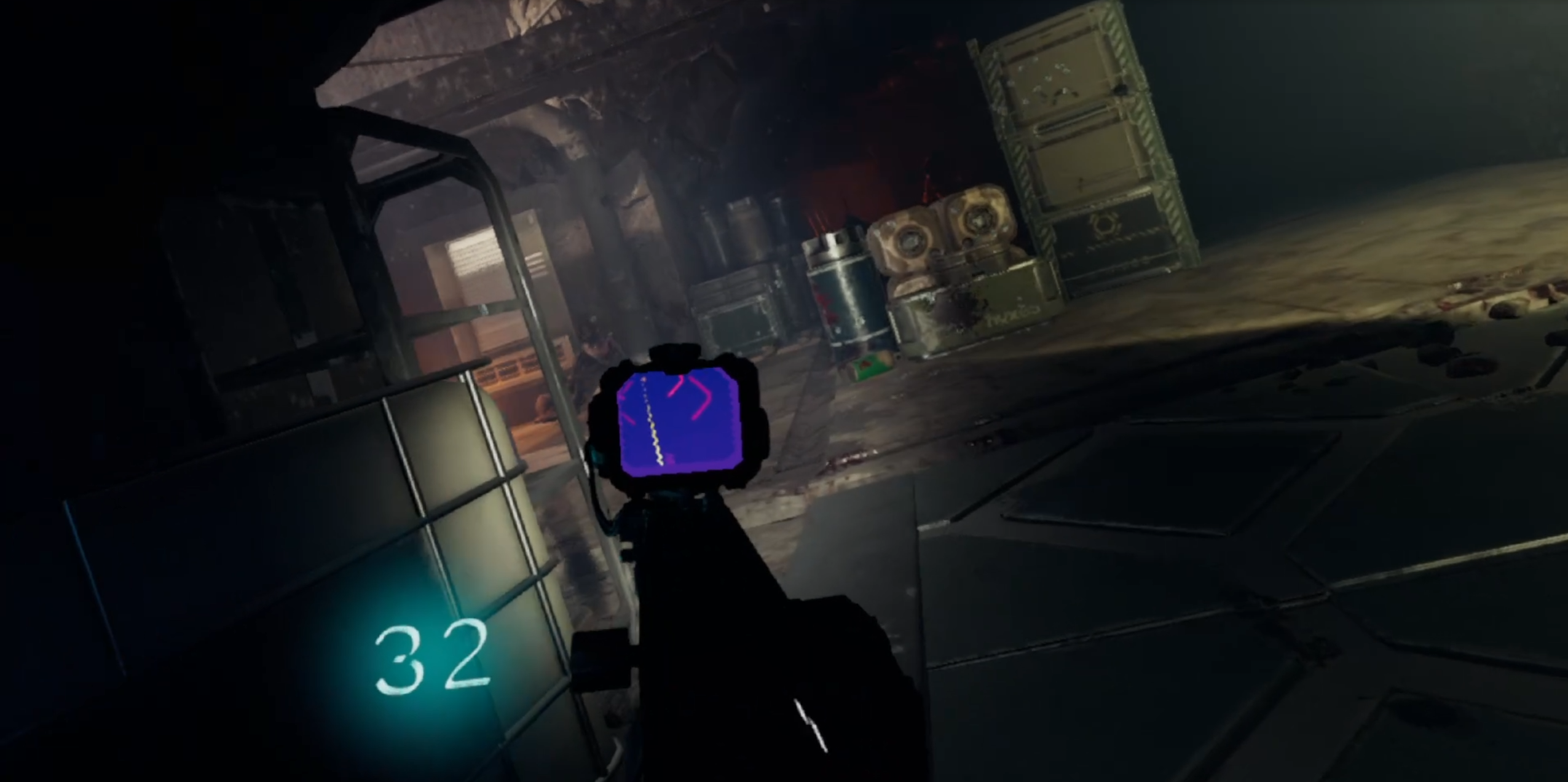 The more UX friendly ammo display.
All of these settings live in a configuration framework that lets players tailor the mod to their liking. Because the framework was created up-front, adding new options like the accessibility features above was trivial. It also made debugging easier by way of in-game runtime UI debug flags. Well worth the time investment.
The Architecture
Because of the game’s early access nature, things basically broke on every game update. Due to this, (and my inexperience at the time) architecture and maintainability took somewhat of a backseat in the early stages of the project.
The design of each overarching part of the codebase was iterated on extensively, but at first emerged from what made the most sense at the time of implementation. Because of this, I had to do a big refactor along the way to split self-contained player-related functionality into components and did another rewrite when the game switched to IL2CPP to clean things up again.
Over time, I realized the biggest problem with mod code in general is that changes to the game are very implicitly coupled to the game code, so you often have to consider both codebases. This sounds rather obvious, but it only gets worse as a mod interacts with more game systems. If the game systems change because of updates, things get very messy, very quickly.
However, making features work from self-contained objects and explicitly separating code injections into different parts of the codebase insulates us from this problem. This did not go as far as - but did have similar benefits to - the general modding APIs we see created and used by modders in games such as Risk of Rain 2.
In simple terms and a simplified example, a lot of cognitive overhead is required to interact with game code. For example, determining where to inject various checks and data retrieval for several different haptics-enhanced events like firing different weapons, taking damage, receiving ammo, etc. just sounds like a pain to do every time. It’s easier to write an in-between layer (or two) once, that will handle this for us.
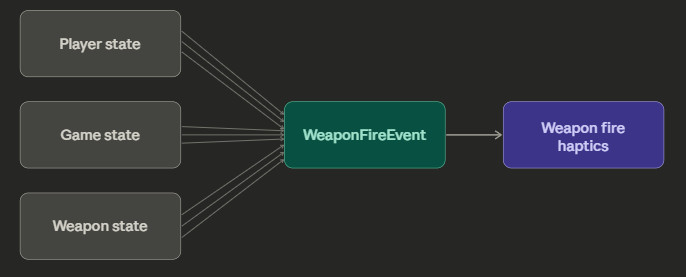 Is the player aiming with two hands? Is he crouching? How much ‘kick’ does the current gun have? Our internal ‘API’ will tell us!
Even if a particular ‘API’ only gets used once, it still makes things very explicit in the codebase, which, in my opinion, is the name of the game when keeping things bug-resistant and easy to understand. Additionally, if things break due to game updates, we often only have to fix our ‘API.’
In the end, the codebase ended up organized in roughly the following splits:
- Injection code, per category (rendering, gameplay, UI, Input, events) that interacted with or directly modified game code.
- Game events that would get called by injected code, broadcasting the act of taking damage, shooting, etc.
- Self-contained behaviour that would get coupled to corresponding Gameobjects such as the player or weapons, or react to game events.
- Helper systems, data structures, etc. to support all of the above.
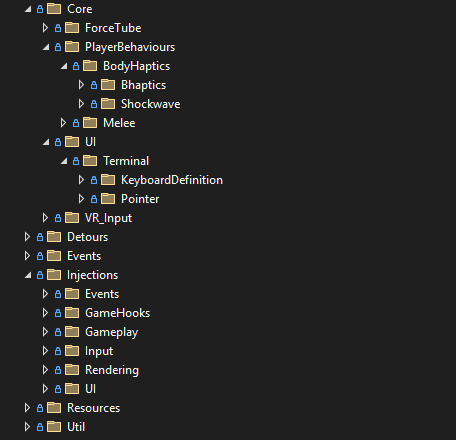 The full folder structure of the project.
Other developers were able to contribute meaningfully without much hand-holding, which I take as a sign the split was at least somewhat reasonable.
Some simpler tricks and general patterns emerged, such as using nameof(Class.Method) for marking injection points, instead of strings, to immediately catch missing methods during compile time instead of at runtime.
In hindsight, the developer experience took a backseat. The iteration time was not great, as game start-up to being in-game took at least 2-3 minutes each time. Because of this, iterating on or testing existing features was sometimes slow and cumbersome.
In a similar vein, I also had thoughts of creating some feature-level automated tests, but I never ended up getting around to it. The time investment always seemed higher than the expected return, because the game didn’t update very often, so I reasoned the features wouldn’t break often either. This ended up being somewhat true, but bugs did seep through, especially on config options that I didn’t use often myself.
What I did end up doing, was automating the creation of the build of the project/GitHub release archive. This saved a lot of time and headaches because I did not have to test each release by hand anymore. I am glad I got around to it and I wish I had invested more time into automation in general.
One option to mitigate the long iteration times could be to explore some kind of live code reloading. In theory, it should not be too difficult. Famous last words.
IL2CPP
An important mention is the switch to IL2CPP somewhere near the full release of the game. IL2CPP basically means that any C# code is converted into C++. IL2CPP additionally has some not-so-fun features such as stripping out any unused code. This basically killed the mod (and other GTFO mods) for a good 6-8 months or so, until modding tools sufficiently developed to allow injection into IL2CPP Unity games.
During some of those months, I ‘worked’ with Knah, one of the leading forces against IL2CPP, to solve issues specific to GTFO VR. Knah is the reason that GTFO VR got revived quite a bit sooner than other mods. Kudos!
(I abused him as if he was my personal AI agent. Sorry Knah!)
To this day, IL2CPP still means no more near-source-code access. Many parts of the codebase haven’t changed much since the Mono days, but many others did. This means firing up IDA Pro or Ghidra and decompiling code by hand if you’re in the ‘wrong’ part of the game’s codebase. Not very fun.
Performance
Performance was always so-so for the mod. The main bottleneck is the GPU. While currently a lot of double work is already being skipped between rendering each eye (shadows, culling, etc.), the game basically still has to render twice per frame. It was, of course, not designed or optimized for this.
Back in 2020 when GTFO initially released, it could only run well in VR on the most powerful hardware. It was playable with a 1070, but a 2080Ti was recommended. Nowadays, while the game’s rendering complexity has increased with updates, modern GPUs can handle it reasonably well. Still, if there’s anything that needs immediate attention in the mod, it would definitely be frame pacing and performance.
I am strongly considering doing another write-up on this specifically, as I’ve been getting more and more into graphics programming over the years and it would be interesting to explore (and possibly improve) GTFO VR’s rendering with my newfound experience.
Open-Source
Releasing and maintaining an open-source project was a first for me. It was surprising to see how much interest there was not only in playing the mod, but also in donating or making contributions. The project paid for all of my coffee for some years and there were many developers who contributed major features and fixes. They improved the mod greatly in many facets.
I found it highly motivating that people openly supported the mod. I ended up very driven by this; to improve the mod not only for myself, but for everyone who was playing and supporting it as well.
Over the years, my interest in the game did wane a bit. New, interesting games came out. Other side projects took priority. For the most part my group of friends and I moved on from playing GTFO. Some job hopping happened, coupled with the necessary preparation and interviews. However, the bug reports, pull requests and suggestions kept rolling in. For a long time I still tended to them, but time and energy were in short supply.
A complicating factor (putting it lightly) is the switch to IL2CPP. Working on the codebase, more often than not, now meant staring at IDA/Ghidra disassembly for hours on end. Any larger system changes are pretty much out of the question. The wall of improving the mod has gotten much higher. There’s a faint hope that the GTFO developers would hand off a Mono assembly of the game to the modding community, but that is most likely a big can of worms for their legal department.
In the end, I put GTFO VR-related work off in favour of R&R or other side projects, which I found more interesting or more useful for my career. I am still highly conflicted on this - on the one hand I would like to support the mod forever, but on the other hand I do have other aspirations and goals. The ideal thing to do here would be to hand the reins to another, but it’s not something I have gotten around to, nor would I feel right dumping work on someone.
The Numbers
To no surprise, creating mods for somewhat obscure games is not something that you can do to make a living. I am, however, still surprised by the amount of donations and especially with the fact that around half of the total donated was donated by a single person. God bless angel investors.
I am also surprised by how many people ended up contributing to the project, since as mentioned, GTFO is a relatively obscure game. Without further ado though, here are the summarized numbers:
- Downloads: ~6K
- Coffee money received: ~€1K
- Commits: 500+
- Hours spent (very roughly): 800h+, not counting the contributions of others
- Unique contributors: 6+ (some PRs pending)
- Nordskogg - Performance, terminal, thermal laser, Pimax bugfixes, UI, bot commands, weapon sights, melee hit detection improvements, proper roomscale movement, etc.
- NicolasAubinet - BHaptics, Shockwave
- Astienth - BHaptics bugfixing, tactvisor support
- MrKerag - Watch model
- MRono - Readme setup rewrite/updates
- Spartan (that’s me!) - Everything else
Closing words
I greatly enjoyed working on GTFO VR and I’m glad I created it. To this day, GTFO is my favourite game and I’m happy I could contribute to its community. Surprisingly, many people got introduced to the game due to the VR mod’s existence.
The project got me some good experience under my belt, which helped out a lot in my early career. It made a good bullet point on my resume and was an interesting talking point in interviews. Most of all though, it reinforced my belief that programming and developing games is the right career for me.
Be sure to check out the mod (and GTFO itself) if you haven’t already!